
Access Control System Overview
GoSafer Security Knowledge Base
This operational reference is organized for GoSafer Security customers and staff. Alarm.com product names are retained where required for technical accuracy.
Overview
Smarter Access Control is a powerful, cloud-based access solution designed for small and medium-sized businesses. Businesses can now take advantage of powerful user management software, remote door control, and scan-to-add card serial detection all from the user-friendly GoSafer Security customer portal (powered by Alarm.com) and Alarm.com app. Smarter Access Control can be installed as a standalone system or as an integrated solution with other intrusion and video offerings. With easy-to-create access plans and simple user management, you can automate your system using rules to reduce hassle and set up notifications so you always know who comes in and when.
| Platform | App + Web |
|---|---|
| Content type | Reference |
| Source last updated | 2025-06-19 |
Procedure
Step-by-step guide: Screenshots and videos are placed with the instruction they illustrate.
Smarter Access Control is a powerful, cloud-based access solution designed for small and medium-sized businesses. Businesses can now take advantage of powerful user management software, remote door control, and scan-to-add card serial detection all from the user-friendly GoSafer Security customer portal (powered by Alarm.com) and Alarm.com app.
Smarter Access Control can be installed as a standalone system or as an integrated solution with other intrusion and video offerings. With easy-to-create access plans and simple user management, you can automate your system using rules to reduce hassle and set up notifications so you always know who comes in and when.
System Overview
The most commonly used Access Control features are available on the Home page and User Access tab of the GoSafer Security customer portal (powered by Alarm.com) and Alarm.com app.
Home page
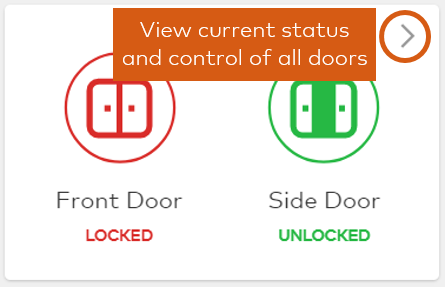
The Home page provides quick access to real-time door control, Scenes, and account activity.
.png?revision=1)
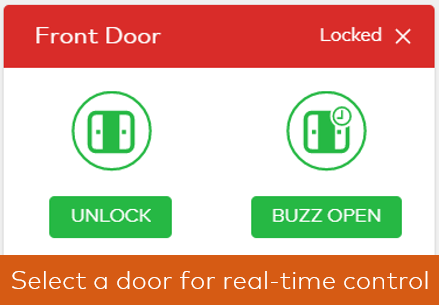
Real-time door control allows you to lock, unlock, and temporarily buzz open doors. Navigate to the Access Points (called Doors in standalone Access Control systems) card on the home screen to control your doors.
 |
 |
User Access tab
The User Access tab is where the configuration of the system takes place. Sub-tabs are available for Access Plans, Users, Access Points, and Manage Logins.
.png?revision=1)
Source and support
For GoSafer Security assistance, visit gosafersecurity.com.
Original Alarm.com reference: https://answers.alarm.com/Customer/Website_and_App/Commercial/Access_Control/Access_Control_System_Overview
Always verify safety, installation, compatibility, and current UI details against the original manufacturer documentation before operational use.
No comments to display
No comments to display