
How do I control multiple partitions of a security panel?
GoSafer Security Knowledge Base
This operational reference is organized for GoSafer Security customers and staff. Alarm.com product names are retained where required for technical accuracy.
Overview
Secondary partitions become available on a customer account after the partition is enabled in the security panel and at least one sensor is assigned to it, with no additional service package cost …
| Platform | App + Web |
|---|---|
| Content type | Reference |
| Source last updated | 2026-03-06 |
Procedure
Step-by-step guide: Screenshots and videos are placed with the instruction they illustrate.
A secondary partition will appear on an account after the partition is enabled in the security panel and has at least one sensor associated with it. There are no additional service package costs to remotely control or use partitions on a customer account.
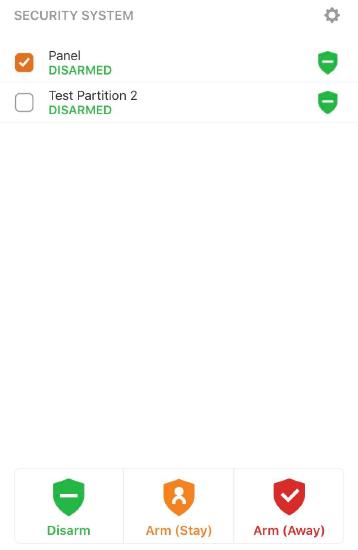
- On the Alarm.com app, the arming level of a partition can be set to whatever is desired by checking the box next to the partition's current status and you can select multiple partitions at the same time. For example, eight partitions can be Armed Away at once.
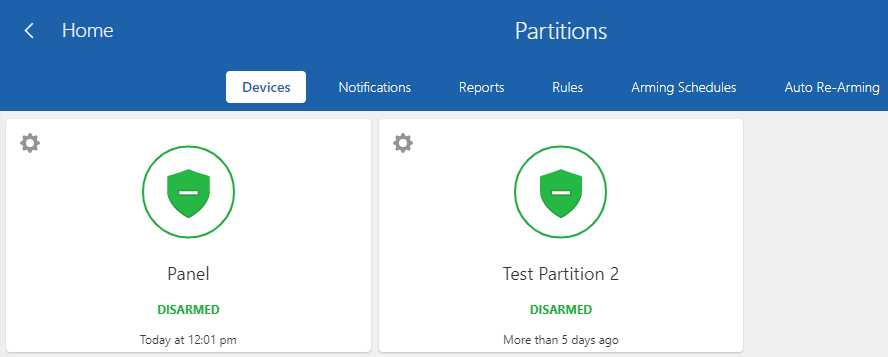
- On the GoSafer Security customer portal (powered by Alarm.com), the second partition will appear below the first partition under Current Arming States.
Note: Selecting multiple partitions can only be done using the Alarm.com app and only if those partitions are all disarmed or if they are all armed (either stay or away). You can also send different commands to different partitions as well (e.g., arm partitions 1 and 2 while leaving partitions 3 and 4 disarmed).
Control multiple partitions using the Alarm.com app:
To view and control secondary partitions individually from the app home screen, you can scroll through them on the Security System card by swiping left or right on the partition status and then tapping the partition to send commands to the individual partition.
Multiple partitions can be commanded at once by using the Security System menu. Tap the Security System card on the home screen and use the checkboxes to select multiple partitions to send commands to.
Control multiple partitions using the GoSafer Security customer portal (powered by Alarm.com):
Partitions can be controlled through the Security System page on the GoSafer Security customer portal (powered by Alarm.com). On this page, you can select any desired partition and send commands to individual partitions.
Source and support
For GoSafer Security assistance, visit gosafersecurity.com.
Original Alarm.com reference: https://answers.alarm.com/Customer/Website_and_App/System_Management/System_Usage/How_do_I_control_multiple_partitions_of_a_security_panel
Always verify safety, installation, compatibility, and current UI details against the original manufacturer documentation before operational use.
No comments to display
No comments to display