
Will I be notified when energy-saving events in the Thermostat Rewards program are active?
GoSafer Security Knowledge Base
This operational reference is organized for GoSafer Security customers and staff. Alarm.com product names are retained where required for technical accuracy.
Overview
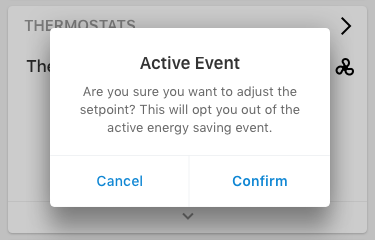
Yes. A pop-up confirmation message will appear if users adjust thermostats during active events in which users are reminded that changing setpoints opts them out of events. This helps prevent accidental opt-outs, which occur when users adjust their thermostats during active demand response events. Email notifications will continue to be sent to participants, as usual. [Active Event Pop Up]
| Platform | Mobile App |
|---|---|
| Content type | Reference |
| Source last updated | 2025-06-04 |
Procedure
Step-by-step guide: Screenshots and videos are placed with the instruction they illustrate.
Yes. A pop-up confirmation message will appear if users adjust thermostats during active events in which users are reminded that changing setpoints opts them out of events. This helps prevent accidental opt-outs, which occur when users adjust their thermostats during active demand response events. Email notifications will continue to be sent to participants, as usual.
To view active event details:
- Log in to the Alarm.com app.
- Tap Thermostats.
- Under the temperature setpoint, a green leaf icon and an Energy Saving Event Active message appear.
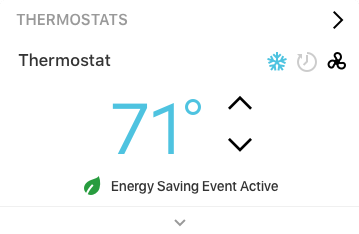
Energy saving event active
- Tap Energy Saving Event Active to see event details, including the start and end time.
Source and support
For GoSafer Security assistance, visit gosafersecurity.com.
Original Alarm.com reference: https://answers.alarm.com/Customer/Website_and_App/Home_Automation/Thermostats/Will_I_be_notified_when_energy-saving_events_in_the_Thermostat_Rewards_program_are_active
Always verify safety, installation, compatibility, and current UI details against the original manufacturer documentation before operational use.
No comments to display
No comments to display