
Alarm.com Flex IO® sensor - LED Patterns and Troubleshooting
GoSafer Security Knowledge Base
This operational reference is organized for GoSafer Security customers and staff. Alarm.com product names are retained where required for technical accuracy.
Overview
The following table displays what the red and yellow LEDs indicate on the Alarm.com Flex IO® sensor.
| Platform | General / Device |
|---|---|
| Content type | Troubleshooting |
| Source last updated | 2023-11-15 |
Procedure
Step-by-step guide: Screenshots and videos are placed with the instruction they illustrate.
The following table displays what the red and yellow LEDs indicate on the Alarm.com Flex IO® sensor.
|
State/Description |
Red LED behavior |
Yellow LED behavior |
|---|---|---|
|
Device booting up |
None |
1 blink  |
|
Device reboot |
None |
None |
|
Diagnostic mode (Bluetooth troubleshooting activated)
For more information, see the signal strength table on Alarm.com Flex IO® sensor - Installation Guide. |
Signal strength indicator, repeats every 8 seconds Pattern based on signal strength. Rate of 1 blink per second. 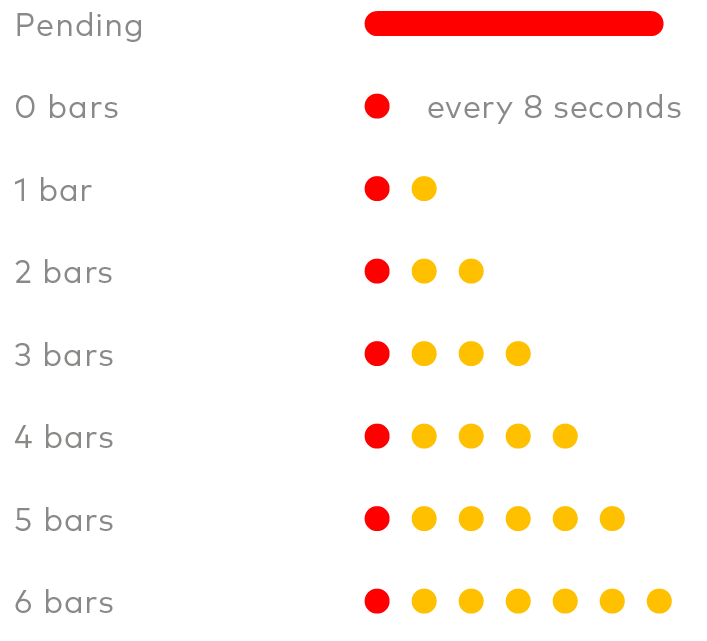 Note: This mode prevents any other pattern from displaying. |
Signal strength indicator, repeats every 8 seconds Pattern based on signal strength. Rate of 1 blink per second. Note: This mode prevents any other pattern from displaying. |
|
Device in idle mode |
None |
None |
|
Device cell modem unable to connect to cell tower To troubleshoot, contact flexsupport@alarm.com. |
2 blink, repeats every 2 seconds  |
None |
|
Device cell modem/SIM not provisioned with carrier To troubleshoot, contact flexsupport@alarm.com. Device will likely need to be returned. |
3 blink, repeats every 2 seconds  |
None |
|
Device unable to connect to Alarm.com To troubleshoot, contact flexsupport@alarm.com. |
4 blink, repeats every 2 seconds  |
None |
|
Contact sensor opens If the device is not reliably reporting open/close events, confirm the magnet position setting matches the installation orientation. |
None |
2 blink  |
|
Contact sensor closes If the device is not reliably reporting open/close status, confirm the magnet position setting matches the installation positions. |
None |
2 blink |
|
Battery door tamper |
1 blink, repeats every 2 seconds  |
None |
|
Device mount tamper |
Alternate Red & Yellow (Red, Yellow, Red, Yellow, 5 second Pause, Repeat)  |
Alternate Red & Yellow (Red, Yellow, Red, Yellow, 5 second Pause, Repeat) |
|
Device low battery |
1 long Red blink (5 seconds) Will occur only following an open/close activation and will follow the normal yellow activity blinks.  |
None |
Source and support
For GoSafer Security assistance, visit gosafersecurity.com.
Original Alarm.com reference: https://answers.alarm.com/Customer/Website_and_App/Cellular_Sensor/Alarm.com_Flex_IO_sensor/Alarm.com_Flex_IO_sensor_-_LED_Patterns_and_Troubleshooting
Always verify safety, installation, compatibility, and current UI details against the original manufacturer documentation before operational use.
No comments to display
No comments to display