
Clear a duress, panic, or smoke alarm
GoSafer Security Knowledge Base
This operational reference is organized for GoSafer Security customers and staff. Alarm.com product names are retained where required for technical accuracy.
Overview
A duress or smoke alarm message can only be cleared using the website. It cannot be cleared using the mobile app.
| Platform | App + Web |
|---|---|
| Content type | Troubleshooting |
| Source last updated | 2025-06-04 |
Procedure
Step-by-step guide: Screenshots and videos are placed with the instruction they illustrate.
A duress, panic, or smoke alarm message can only be cleared using the GoSafer Security customer portal (powered by Alarm.com). It cannot be cleared using the Alarm.com app.
The message will eventually disappear on its own after a few days. For duress alarms, the Alert message will also clear when the system is disarmed by a user code that is not the duress code. If the alarm is not clearing, contact your service provider.
Important: If an alarm is still active locally, you must acknowledge the alarm at the panel before the trouble can clear on the GoSafer Security customer portal (powered by Alarm.com) and Alarm.com app.
To clear a duress or smoke alarm alert:
- Log in to the GoSafer Security customer portal (powered by Alarm.com).
- In the Welcome card, click Details for Panel Duress, Panic, or Smoke Sensor Must Be Reset.
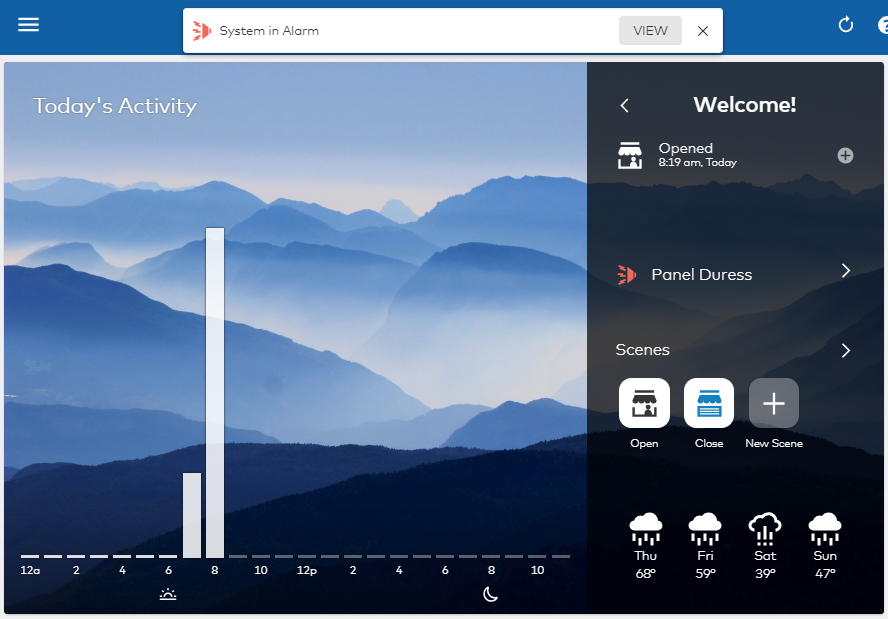
System in duress - You can also click View in the System in Alarm banner to navigate to the Alerts & Issues page.
- If you do not see the Welcome card, you may have it hidden. For more information about locating and arranging the Welcome card, see Rearrange Home page of website or app.
- In Alerts & Issues:
- For a duress alert, click Stop Alarm and confirm to stop the alarm.
- For a smoke sensor reset alert, click Remove Alert.
- Once it's confirmed to stop or remove the alert, it acknowledges the alarm and clears the alert message from the GoSafer Security customer portal (powered by Alarm.com) and Alarm.com app.
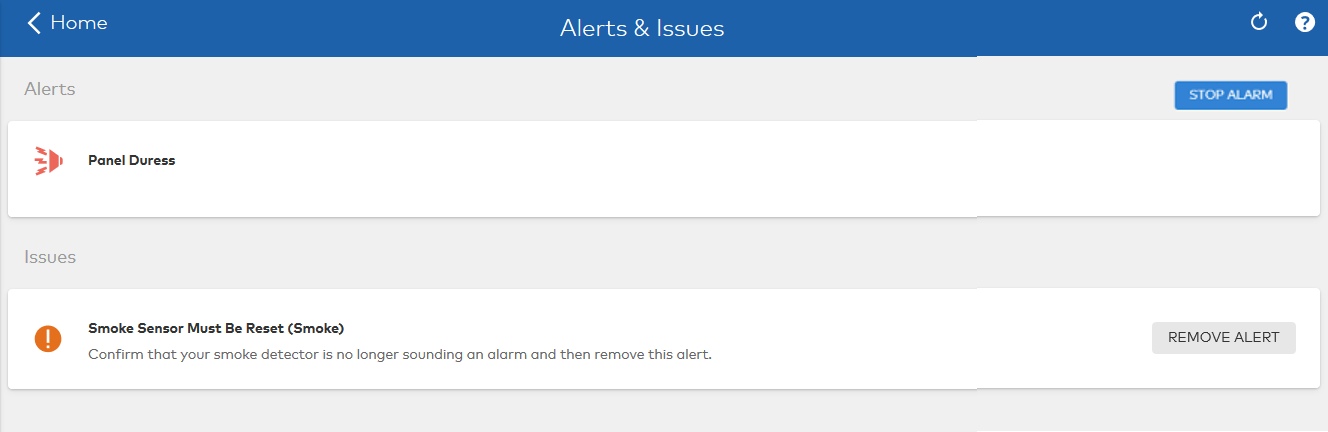
Clear a duress or smoke
For more information about this feature, contact your service provider.
Source and support
For GoSafer Security assistance, visit gosafersecurity.com.
Original Alarm.com reference: https://answers.alarm.com/Customer/Website_and_App/System_Management/System_Usage/Clear_a_duress_panic_or_smoke_alarm
Always verify safety, installation, compatibility, and current UI details against the original manufacturer documentation before operational use.
No comments to display
No comments to display