
How should I configure Video Motion Detection (VMD) settings for a video device?
GoSafer Security Knowledge Base
This operational reference is organized for GoSafer Security customers and staff. Alarm.com product names are retained where required for technical accuracy.
Overview
Video Motion Detection (VMD) works by looking for motion in specific areas (i.e., windows) of the camera's view. You can customize the size, location, sensitivity, and target size of the VMD windows to reduce false positive or missed motion. For more information about adjusting Video Motion Detection settings, see Change a camera's Video Motion Detection settings.
| Platform | General / Device |
|---|---|
| Content type | How-to / Configuration |
| Source last updated | 2025-05-07 |
Procedure
Video Motion Detection tutorial video
Open the tutorial video in a new window
Window locations and sizes
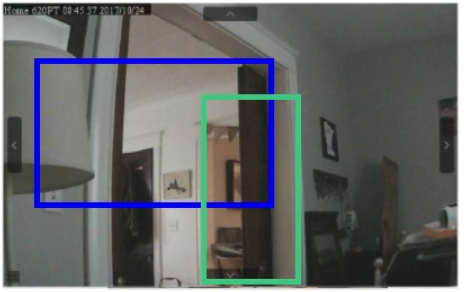
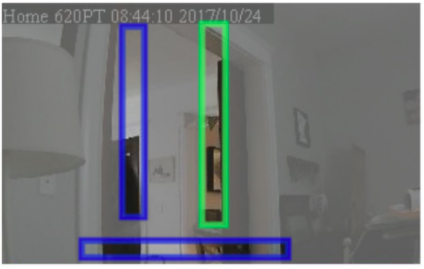
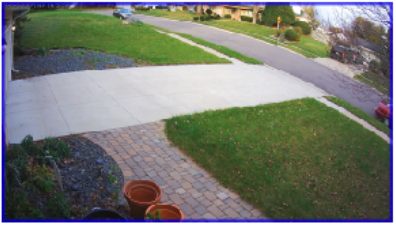
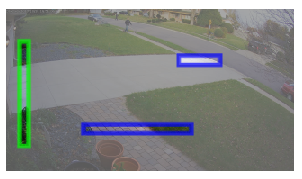
A video device's VMD windows work best if you think of them like tripwires. Create longer and narrower boxes in areas that must be passed through to reach the area of interest. Keep in mind that it is recommended to avoid placing VMD windows in highly dynamic areas (e.g., large reflective surfaces, large areas where shadows come and go, or trees and bushes that move due to wind).
VMD best practices for indoor cameras
| Incorrectly configured | Best practice |
|---|---|
 |
 |
VMD best practices for outdoor cameras
| Incorrectly configured | Best practice |
|---|---|
 |
 |
Target size
Target size is the percentage of the window that includes movement to trigger a clip recording. If the target size is too large, the camera may not trigger for anything less than an object the size of a car. If the target size is too small, leaves blowing in the wind may trigger recordings. It is recommended to estimate the percentage of a window that a person, or whatever you want to record, would fill and then select one size larger.
Sensitivity
Sensitivity is a measure of how drastic a change is needed to trigger a clip. Higher sensitivity means a smaller change in the video is needed to trigger a clip, but if the sensitivity is too high, the camera may trigger constantly.
Note: For camera models ADC-V521IR, ADC-V522IR, and ADC-V722W, the sensitivity setting affects all Video Motion Detection (VMD) windows for the specific device.
At-Home Settings
The At-Home Setting, when enabled, pauses recording rules when the system is disarmed or a Geo-Device is inside of the Home Geo-Fence. This can help prevent unwanted or unnecessary recording.
Video and instructional images are embedded from the original Alarm.com article and remain © Alarm.com. If a media link changes, use the original reference below.
Source and support
For GoSafer Security assistance, visit gosafersecurity.com.
Original Alarm.com reference: https://answers.alarm.com/Customer/Website_and_App/Video/Video_Settings/How_should_I_configure_Video_Motion_Detection_(VMD)_settings_for_a_video_device
Always verify safety, installation, compatibility, and current UI details against the original manufacturer documentation before operational use.