View the Images Event Gallery
GoSafer Security Knowledge Base
This operational reference is organized for GoSafer Security customers and staff. Alarm.com product names are retained where required for technical accuracy.
Overview
The Image Sensor Gallery can be viewed from the website and the app.
| Platform | App + Web |
|---|---|
| Content type | Reference |
| Source last updated | 2025-06-04 |
Procedure
Step-by-step guide: Screenshots and videos are placed with the instruction they illustrate.
The Images Event Gallery displays the images uploaded by your devices (i.e., Image Sensor). Images are taken according to the rules that are set for the image devices on your account and are available on the Alarm.com app and GoSafer Security customer portal (powered by Alarm.com).
For more information about how to create rules, see Upload captured images to the Image Sensor Gallery.
To view the Images Event Gallery using the Alarm.com app:
- Log in to the Alarm.com app.
- Tap Images.
- In the Gallery, view all saved images and tap on any image to enlarge it. Search parameters can also be applied to find specific events:
- Tap Filter.
- In Show, tap to select a specific time frame.
- In Events, tap to select and type of events to search for.
- Tap Apply.
To view the Images Event Gallery using the GoSafer Security customer portal (powered by Alarm.com):
- Log in to the GoSafer Security customer portal (powered by Alarm.com).
- On the Images card, click Details as outlined in the following example image.
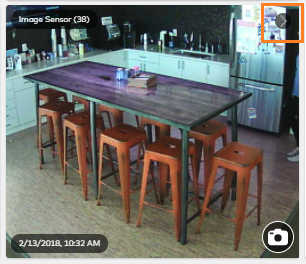
View Gallery button outlined
- In the Event Gallery, view all images. Search parameters can also be applied to find specific events:
- Select a specific date/time by clicking Calendar.
- Select the specific events to search for using the All Reasons dropdown menu.
- Click Go.
Source and support
For GoSafer Security assistance, visit gosafersecurity.com.
Original Alarm.com reference: https://answers.alarm.com/Customer/Website_and_App/Image_Sensor/Image_Sensor_Usage/View_the_Images_Event_Gallery
Always verify safety, installation, compatibility, and current UI details against the original manufacturer documentation before operational use.