# Qolsys panel is disarming by itself
**GoSafer Security Knowledge Base**
*This operational reference is organized for GoSafer Security customers and staff. Alarm.com product names are retained where required for technical accuracy.*
## Overview
If a Qolsys panel is disarming by itself, verify if you have Bluetooth disarming enabled. A compatible Qolsys panel has the ability to enable a Bluetooth device to disarm the system from an armed away state when it comes within range of the panel. Compatible Qolsys panels include Qolsys IQ Panel 2, IQ Hub, IQ Panel 4, and IQ4 Hub. If the system is disarmed by a Bluetooth device, the name of the Bluetooth device displays as disarming the system in Activity as shown in the following example. \[Bluetooth Device Iqp2 Disarming Example\]
Platform
App + Web
Content type
How-to / Configuration
Source last updated
2025-06-04
## Procedure
**Step-by-step guide:** Screenshots and videos are placed with the instruction they illustrate.
If a Qolsys panel is disarming by itself, verify if you have Bluetooth disarming enabled. A compatible Qolsys panel has the ability to enable a Bluetooth device to disarm the system from an armed away state when it comes within range of the panel. Compatible Qolsys panels include Qolsys IQ Panel 2, IQ Hub, IQ Panel 4, and IQ4 Hub.
If the system is disarmed by a Bluetooth device, the name of the Bluetooth device displays as disarming the system in *Activity* as shown in the following example.
Bluetooth device IQP2 disarming example
### **To verify Bluetooth disarming devices using the GoSafer Security customer portal (powered by Alarm.com):**
1. Log in to the GoSafer Security customer portal (powered by Alarm.com).
2. Click **Settings**.
3. Click **Manage Devices**.
4. In *Security*, Bluetooth disarming devices display similar to a sensor.
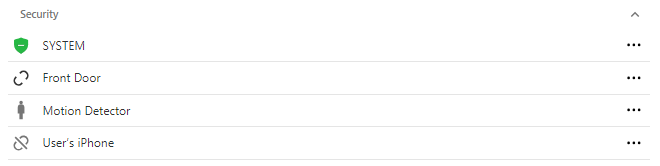Security with bluetooth device
**Note**: The panel must be used to disable Bluetooth disarming devices.
### To verify Bluetooth disarming devices using the panel:
1. Flick to access the settings tray on the panel.
2. Tap **Settings**.
3. Tap **Advanced Settings**.
4. Enter your code.
5. Tap **Bluetooth Devices**.
6. Tap **Edit Device**.
7. Verify if the device disarming the system is listed as a Bluetooth device.
- If you want to disable disarming for a Bluetooth device:
1. Tap Edit for the device to disable.
2. Using the *Disarming* dropdown menu, select **Disable Disarming**.
3. Tap **Update**.
**Note**: The *Bluetooth Disarm Timeout* setting is the amount of time the system waits until the Bluetooth device is able to disarm. This allows time for the Bluetooth device to get out of range of the panel so that the panel is not automatically disarmed.
## Source and support
For GoSafer Security assistance, visit [gosafersecurity.com](https://gosafersecurity.com/).
Original Alarm.com reference: [https://answers.alarm.com/Customer/Website\_and\_App/System\_Management/System\_Usage/Qolsys\_panel\_is\_disarming\_by\_itself](https://answers.alarm.com/Customer/Website_and_App/System_Management/System_Usage/Qolsys_panel_is_disarming_by_itself)
Always verify safety, installation, compatibility, and current UI details against the original manufacturer documentation before operational use.