# Create a sensor activity notification
**GoSafer Security Knowledge Base**
*This operational reference is organized for GoSafer Security customers and staff. Alarm.com product names are retained where required for technical accuracy.*
## Overview
A sensor activity notification can notify users if a contact sensor is opened or a motion sensor is activated.
Platform
App + Web
Content type
How-to / Configuration
Source last updated
2025-06-04
## Procedure
**Step-by-step guide:** Screenshots and videos are placed with the instruction they illustrate.
Sensor activity monitoring (SAM) allows users to view the current status of the system's sensors.
Once SAM is enabled for sensors, sensor activity notifications can be configured to receive direct notifications about a sensor's activity by email, text message, or push notification. For more information about setting up sensor activity notifications, see [Create a sensor activity notification](https://answers.alarm.com/Customer/Website_and_App/System_Management/Notifications/Create_a_sensor_activity_notification).
### **To turn sensor activity monitoring on/off:**
This setting can only be updated using the GoSafer Security customer portal (powered by Alarm.com). For further assistance, contact your service provider.
1. Log in to the GoSafer Security customer portal (powered by Alarm.com).
2. Click **Settings**.
3. Click **Manage Devices**.
4. Click ****More options**** next to the device to update.
5. Click **Device Settings**.
6. In the *Monitoring* column, click to select the sensors that should have sensor activity monitoring. Alternatively, click to uncheck to remove activity monitoring.
**Note**: In the following example, sensors 1 and 3 have SAM enabled, sensor 2 has SAM disabled, and SAM is not available for the fixed panic keypad.
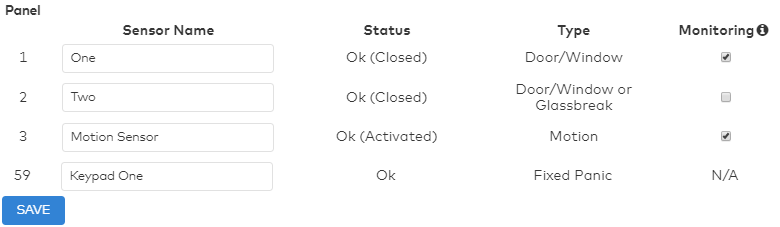Sensor list
7. Click **Save**.
### Turn sensor activity monitoring on/off videos
Expand all
### Turn SAM on - VideoIcn Chevron Up
### Turn SAM off - Video
Icn Chevron Up
## Source and support
For GoSafer Security assistance, visit [gosafersecurity.com](https://gosafersecurity.com/).
Original Alarm.com reference: [https://answers.alarm.com/Customer/Website\_and\_App/System\_Management/Notifications/Create\_a\_sensor\_activity\_notification](https://answers.alarm.com/Customer/Website_and_App/System_Management/Notifications/Create_a_sensor_activity_notification)
Always verify safety, installation, compatibility, and current UI details against the original manufacturer documentation before operational use.