# Change the thermostat setpoint
**GoSafer Security Knowledge Base**
*This operational reference is organized for GoSafer Security customers and staff. Alarm.com product names are retained where required for technical accuracy.*
## Overview
The thermostat setpoint can be managed remotely so you can control the temperature on the go.
Platform
App + Web
Content type
Reference
Source last updated
2025-06-04
## Procedure
**Step-by-step guide:** Screenshots and videos are placed with the instruction they illustrate.
The thermostat setpoint can be managed from the Alarm.com app and GoSafer Security customer portal (powered by Alarm.com) so you can control the temperature on the go.
### Change the thermostat setpoint
Expand all
### To change the thermostat setpoint using the Alarm.com app:Icn Chevron Up
1. Log in to the Alarm.com app.
2. In the *Thermostats* card, verify the thermostat is in the desired mode.
3. Tap Upor Down to adjust the set point temperature(s).
**Important**: When using Auto mode, the Heat (left) and Cool (right) setpoints must be separated by at least 3 degrees to prevent the thermostat from toggling constantly between heating and cooling. Setting the Cool and Heat target temperatures less than 3 degrees from each other will waste energy without providing additional comfort.
### To change the thermostat setpoint using the GoSafer Security customer portal (powered by Alarm.com):Icn Chevron Up
1. Log in to the GoSafer Security customer portal (powered by Alarm.com).
2. In the *Thermostats* card, verify the thermostat is in the desired mode.
3. Click Upor Down to change the thermostat setpoint(s).
**Important**: When using Auto mode, the Heat and Cool setpoints must be separated by at least 3 degrees to prevent the thermostat from toggling constantly between heating and cooling. Setting the Cool and Heat target temperatures less than 3 degrees from each other will waste energy without providing additional comfort.
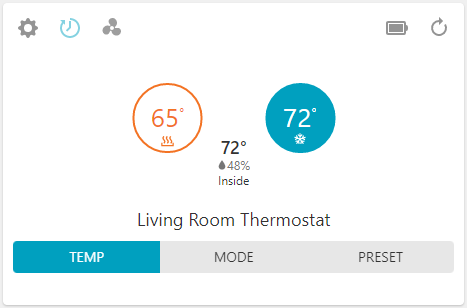Thermostat Auto Mode Customer Site
For more information about changing the thermostat mode, see [Change the thermostat mode](https://answers.alarm.com/Customer/Website_and_App/Home_Automation/Thermostats/Change_the_thermostat_mode).
## Source and support
For GoSafer Security assistance, visit [gosafersecurity.com](https://gosafersecurity.com/).
Original Alarm.com reference: [https://answers.alarm.com/Customer/Website\_and\_App/Home\_Automation/Thermostats/Change\_the\_thermostat\_setpoint](https://answers.alarm.com/Customer/Website_and_App/Home_Automation/Thermostats/Change_the_thermostat_setpoint)
Always verify safety, installation, compatibility, and current UI details against the original manufacturer documentation before operational use.