# Change the monitoring station location phone number
**GoSafer Security Knowledge Base**
*This operational reference is organized for GoSafer Security customers and staff. Alarm.com product names are retained where required for technical accuracy.*
## Overview
In the case of an emergency where you are unable to disarm the system, the monitoring station may call to verify the alarm. This typically involves contacting you at the location where the system is …
Platform
App + Web
Content type
How-to / Configuration
Source last updated
2025-06-04
## Procedure
**Step-by-step guide:** Screenshots and videos are placed with the instruction they illustrate.
Depending on the type of alarm event, the location phone number may be contacted either before or after a dispatch to authorities has been made to verify the alarm.
Emergency contact information (e.g., Location \[Premise\] phone numbers, verbal passcodes, contact lists, and per-contact passcodes) can be modified using the website and app. For more information about how to change emergency contact information, see the following:
- Verbal passcode - [Change the monitoring station verbal passcode](https://answers.alarm.com/Customer/Website_and_App/System_Management/System_Usage/Change_the_monitoring_station_verbal_passcode).
- Emergency contact information - [Change the monitoring station emergency contact information](https://answers.alarm.com/Customer/Website_and_App/System_Management/System_Usage/Change_the_monitoring_station_emergency_contact_information).
******Important******: This feature is only available if it is supported by the selected monitoring station and enabled by your service provider.
### **To change the monitoring station location phone number using the Alarm.com app:**
1. Log in to the Alarm.com app.
2. Tap ****Menu****.
3. Tap **Monitoring Settings**.
4. Tap **Location Phone Number**.
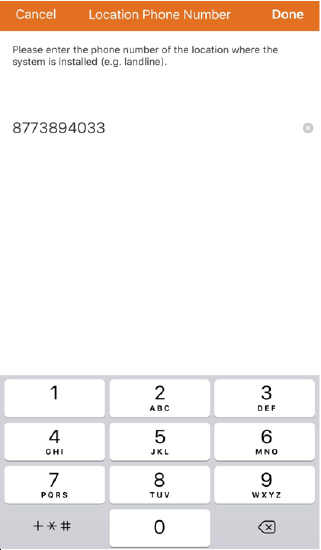
5. Enter the phone number of the location where the system is installed (e.g., landline).
**Note**: If there is no landline on location, enter a main contact number.
ECM Location Phone Mobile
6. Tap **Done**.
### **To change the monitoring station location phone number using the GoSafer Security customer portal (powered by Alarm.com):**
1. Log in to the GoSafer Security customer portal (powered by Alarm.com).
2. Click Settings.
3. Click Monitoring Station.
4. Click **Location Settings**.
5. Click **Edit**.
6. In *Phone Number*, enter the phone number of the location where the system is installed (e.g., landline).
**Note**: If there is no landline on location, enter a primary contact number.
7. Click **Update**.
## Source and support
For GoSafer Security assistance, visit [gosafersecurity.com](https://gosafersecurity.com/).
Original Alarm.com reference: [https://answers.alarm.com/Customer/Website\_and\_App/System\_Management/System\_Usage/Change\_the\_monitoring\_station\_location\_phone\_number\_on\_a\_customer\_account](https://answers.alarm.com/Customer/Website_and_App/System_Management/System_Usage/Change_the_monitoring_station_location_phone_number_on_a_customer_account)
Always verify safety, installation, compatibility, and current UI details against the original manufacturer documentation before operational use.